PurgeSent 1.0 *Crack*
Monday, July 12, 2010

Download 1.0 Cracked : Official
PurgeSent removes all Sent Items from iPhone for POP email accounts. not compatible with IMAP.

Notes :
Icon Label Background 1.0
Monday, July 12, 2010

Download 1.0 : Official
Icon Label Background is a new tweak from ModMyi , available on Cydia.
Associated toWinterBoard, this tweak will permit you to add transparency on the labels of your apps on your springboard.


Repo : ModMyi
Version : 1.0
Autor : CrowbarGame
Compability : OS x3,iOS 4
Price : free
Notes :
- Must be activated in Winterboard
- Installation
[How-To] Jailbreak iPhone 3GS *New iBoot* FW 4.0 using iBooty [Windows]
Monday, July 12, 2010

Update : iBooty has been updated to v1.6 ! Added a video tutorial.
iH8sn0w has posted a process quite complex to jailbreak iOS 4 for iPhone 3GS with new iBoot.
This jailbreak based on the creation of a custom firmware using Sn0wbreeze, that you will install thanks to a new tool iBooty from iH8sn0w.
It is a TETHERED JAILBREAK = whenever you turn off your phone, you will need to re-connect it to a computer to be able to turn it back on

iPhone 3GS, find the version of your iBoot.Required :
For old iBoot, follow this guide.
For iPhone 3GS with new iBoot, this tutorial concerns you !
- iPhone 3GS New iBoot. [Windows only]
- Have your ECID (shsh) signed for FW 3.1.2 only on Saurik server.
- IBSS Grabber
- Payload Pwner rc6
- iBooty 1.6
- Sn0Wbreeze 1.6.2
- Libusb (links below)
- Firmwares 3.1.2 and 4.0
- iTunes 9.2
First condition : Have your file shsh 3.1.2 signed with Saurik server.
- Modify your file Host. Read this guide.
- You can have locally your ECID/ShSh on your PC grabbed with Umbrella.
- If you do NOT have your ECID/ShSh signed for firmware 3.1.2, it is NOT possible to do it, actually only Firmware 4.0 is signed !
Grab the fileIBSS from Firmware 3.1.2

- Put your iPhone in DFU mode (black screen)
- Use the software IBSS Grabber
- Click on Save. Save the folder or the file IBSS on your desktop of your computer.
- Then click on "Start Watching".
- When it is finished, start iTunes and restore the Firmware 3.1.2
- When the restore is finished, go to the folder thath you put on your desktop thanks to IBSS Grabber.
- In this folder, go to Firmware and then in the folder DFU.
- You will find the file IBSS extracted from the Firmware 3.1.2.
Creation of a Custom Firmware iOS 4
Free your IBSS and iBoot
- Execute the tool Payload Pwner
- Follow the steps.
- This will create some files that you must copy in the same folder as iBooty.
Prepare iBooty

- Extract with 7-zip your Custom Firmware created before with Sn0wbreeze.
- Put the files or folder Kernelcache and Firmware/DFU/iBEC.n88ap.RELEASE.dfu in the same folder as iBoot
- iBSS 3.1.2 signed to « ibss312.dfu »
- Kernel 4.0-Custom to « kernel.40″
- iBEC 4.0-Custom to « ibec40.dfu »
So, in the folder iBooty, you should have the following files :
* iboot.payload – created with Payload Pwner.* exploitibss312 – created with Payload Pwner.
* ibec40.dfu – extracted from Custom Firmware created with Sn0wbreeze.
* irecovery.exe – included with iBooty.
* readline5.dll – included with iBooty.
* iBooty.exe – included with iBooty.
* ibss312.dfu – your IBSS file during the restore of FW 3.1.2
* kernel.40 – extracted from Custom Firmware created with Sn0wbreeze.
* sn0w.img3 – included with iBooty.
Restore Firmware iOS 4 Custom.
- You are with Firmware 3.1.2 restored just before.
- Start iBooty.exe and select "Prepare Device for Custom Firmware". The process starts and you will obtain snow, you can continue..
- Start iTunes, then press SHIFT + Restore to install Custom iOS 4
- At the end of the restore, the screen is black, this is normal !
Activate your Custom iOS 4
- Start iBooty.exe
- Click on « Boot It »
You should then have a jailbroken iOS 4 on your iPhone 3GS New iBoot.
Notes :[How-To] Jailbreak iPhone 3GS *New iBoot* FW 4.0 using iBooty [Mac]
Monday, July 12, 2010
Update : iBooty has been updated to v1.6 ! Added a video tutorial.
iH8sn0w has posted a process quite complex to jailbreak iOS 4 for iPhone 3GS with new iBoot.
This jailbreak based on the creation of a custom firmware using Sn0wbreeze, that you will install thanks to a new tool iBooty from iH8sn0w.
It is a TETHERED JAILBREAK = whenever you turn off your phone, you will need to re-connect it to a computer to be able to turn it back on
iPhone 3GS, find the version of your iBoot.Required :
For old iBoot, follow this guide.
For iPhone 3GS with new iBoot, this tutorial concerns you !
- iPhone 3GS New iBoot. [Mac only]
- Have your ECID (shsh) signed for FW 3.1.2 only on Saurik server.
- IBSS Grabber
- Payload Pwner rc6
- iBooty 1.6
- Sn0Wbreeze 1.6.2
- Libusb (links below)
- Firmwares 3.1.2 and 4.0
- iTunes 9.2
Warning Note: All the standard warnings apply. This is for advanced users only. Only proceed if you think you know your iPhone inside out.
Required :
xpwntool
iOS 3.1.2, 4.0
iOS 3.1.2 SHSH blobs
=>> Download this
STEP 1 : Grabbing your 3.1.2 iBSS file.
Pointing your hosts :
I : If you have your shsh blobs saved on Cydia/Saurik’s server then follow this tutorial.
II : If you have it saved with TinyUmbrella, then download the GUI here.
Restoring to grab the iBSS file.
I : Place your device in DFU.
II : Start up the iBSS/iBEC grabber.
III : Put the save folder on a new folder on your desktop.
IV : Hit "Start Monitoring".
V : Now go back to iTunes and do SHIFT + Restore. Then browse for your 3.1.2 IPSW. You will need to restore to 3.1.2 in order to pwn 4.0.
STEP 2: Creating your custom firmware
Use Pwnage Tool to create a custom ipsw ignore the warnings about the new bootrom.
STEP 3:Once you have jailbroken your phone, you can unlock it using ultrasn0w 0.93 (on any baseband), guide for which is posted here.
Extract the zip file we downloaded earlier and use terminal to enter it
STEP 4:
Create a new folder inside this called 3.1.2 and extract your 3.1.2 ipsw here (unzip *.ipsw in terminal)
STEP 5:
Use xpwntool to patch iBoot & iBSS (run this in terminal)
xpwntool Firmware/dfu/iBSS.n88ap.RELEASE.dfu ibss.d -iv 41639d34547ae3dd7921bf3539dba529 -k 9121de4a038675d92e1a28683b2138b7a3bdb80994273d090398051c7f5af53c; bspatch ibss.d ../exploitibss312 ../ibss.patch; xpwntool Firmware/all_flash/all_flash.n88ap.production/iBoot.n88ap.RELEASE.img3 iboot.d -iv 127aa60e77da219961ee70707f44cbd4 -k c72ab4aae971f3a9ec356dfe555e4aef72d8e96c480698445ac236904e6a3443; bspatch iboot.d ../iboot.payload ../iboot.patch; cd ..; rm -rf 3.1.2STEP 6:
Create a folder called 4.0_cust inside 4.0_pwn and enter it with terminal and copy your custom 4.0 ipsw here.
STEP 7:
Extract your custom ipsw (unzip *.zip)
STEP 8:
Run the following in terminal:
cp kernelcache.release.n88 ../kcache.40; cp Firmware/dfu/iBEC.n88ap.RELEASE.dfu ../iBEC.40; cd ..;STEP 9:
Copy your signed iBSS from earlier into 4.0_pwn
STEP 10:
Place your device in DFU mode (power home for 10 seconds, release power keep holding home (blank screen and itunes asking to restore).
STEP 11:
Run the following in terminal:
./irecovery -u ibss312.dfu; ./irecovery -r; sleep 10; ./irecovery -e exploitibss312; ./irecovery -u iBEC.40; ./irecovery -c go; sleep 10; ./irecovery -u sn0w.img3; ./irecovery -c "setpicture 0"; ./irecovery -c "bgcolor 1 1 1";STEP 12:
Restore your custom 4.0 ipsw
Booting your device:
Run the following in terminal (once in the 4.0_pwn directory):
./irecovery -u ibss312.dfu; ./irecovery -r; sleep 10; ./irecovery -e exploitibss312; ./irecovery -u iBEC.40; ./irecovery -c go; sleep 10; ./irecovery -u sn0w.img3; ./irecovery -c "setpicture 0"; ./irecovery -c "bgcolor 1 1 1"; ./irecovery -u kcache.40; ./irecovery -c bootx;iTunes will detect your device several times before it boots.
PS: When i wake up i will write a script to automate most of this.
[How-To] Jailbreak iPhone 3GS / iPod Touch 2G (MC) / 3G FW 4.0 using iBooty [Windows] *Update*
Monday, July 12, 2010

Update : iBooty has been updated to v1.6 ! Added a video tutorial.
iH8sn0w has just updated his software iBooty, avoiding you to use libusb.
Here is a new guide quite complex to jailbreak your iOS 4 for iPhone 3GS new iBoot, iPod Touch 2G (MC) and 3G.
But this models MUST be with firmware 3.1.2 only !
You must have your ShSh blobs signed for 3.1.2 to downgrade if you have FW 4.0You will create a custom iOS 4 with Sn0wbreeze v1.7 and install with iTunes and iBooty
- iPhone 3GS new iBoot, iPod Touch 2G (MC) and 3G.
- Firmware 3.1.2
- Windows only.
- Sn0wbreeze v.1.7
- iBooty 1.6
- Payload Pwner-r6
- Firmwares
- iTunes 9.2
Pwning iBoot

- Extract Payload Pwner-r4.1 with 7-zip.

- Choose your model.

- Choose Firmware 3.1.2

- Pwner must create a file PAYLOAD and you must put it in the same folder as iBooty.exe

Create your Custom iOS 4


- Disable NOR Flash must be ticked
- Then tick options you need!

- The creation of the custom firmware is still the same as this guide.
Your custom iOS 4 is created and is located on the desktop of your PC.
iBooty
- Download iBooty and extract it into a folder.
- Unzip with 7-zip your custom iOS 4 created previously.
- Put kernelcache in the same folder as ibooty.exe
- Also for IBEC located in « Firmware \ DFU ».
And for DeviceTree located in « Firmware \ all_flash all_flash.n88ap.production \ \ DeviceTree.n88ap
- Rename Kernel 4.0-Custom to kernel.40
- Rename iBEC 4.0-Custom to ibec.40
- Rename DeviceTree 4.0-Custom to devtree.40
- iboot.payload – Created by Payload Pwner.
- devtree.40 – extracted from Custom iOS4 done with Sn0wbreeze.
- ibec.40 – created with Payload Pwner.
- bspatch.exe - included in iBooty.
- iBooty.exe - included in iBooty.
- kernel.40 – extracted from Custom iOS4 done with Sn0wbreeze.
- sn0w.img3 – included in iBooty.
- wait.img3 – included in iBooty.
- Be sure to be with firmware 3.1.2 installed
- Start iBooty.exe

- Click on Prepare Device for Custom Firmware
- Then start iTunes 9.2 and restore iOS 4 Custom.
- At the end of the restore, your iDevice is in Recovery Mode.
- Click on Boot It to leave Recovery Mode.
- You are now with jailbroken iOS 4 custom.
iAdKiller 0.1
Monday, July 12, 2010

Download 0.1 : 4shared
Here is an application of Yllier, dev of Firewall IP, which will permit you to disable iAd from your AppStore's applications.
The application is free!

- iAd is the new system of advertisements integrated into the new apps of the AppStore since the iOS 4.
- It is only compatible with iOS 4.
- This will be included in the future update of Firewall IP.
Version : 0.1Official website.
Autor : Yllier
Compability : iOS 4
Price : gratuit
Notes :
- Installation then respring.
- No icon, no settings, it works that's all !!
[News] Geohot jailbreaks iPhone 4 !!
Sunday, July 11, 2010

After months of silence
, Geohot has finally published a new blog post

in which he talks about iPhone 4 jailbreak situation, limera1n, and Pwned4life exploit which he recently talked about at the Nuit Du Hack conference in Paris. According to his latest blog post, he has managed to jailbreak his iPhone 4 the day it got delivered to him by mail. This is what he writes on his blog:
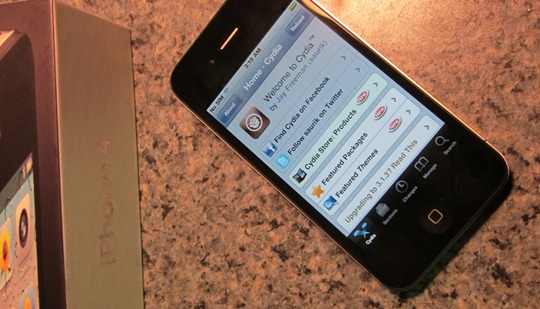
Got one of these in the mail today and figured I’d give it a shot.As for the release dates, it probably wont happen from him. Comex’s Spirit like jailbreak tool is still the most likely candidate for the release, which will probably happen once Apple rolls out the new iOS 4.0.1 / 4.1 firmware
As far as a release goes, it probably won’t happen from me. limera1n is little more than a raindrop on a website; it was never mentioned by me previous to this post. pwned4life is a complete invention of some blogger in a basement somewhere. When I said pwned for life, I was referring to the original iPhone, 3G, and Touch; which of course are, by the aptly named PwnageTool.
Again, please don’t ask for release dates. Every person that does makes me want to release a little bit less.
update for iPhone 4, 3GS and 3G.
iProxify 1.1
Thursday, July 08, 2010

Download 1.1 : Official
Free application available on repo ModMyi, it will permit you to surf anonymously by using a proxy, IP address changed.

Repository : ModMyi
Auteur : YvanSoftware
Compability : OS x3, iOS4
Price : free
Notes :
Subscribe to:
Posts (Atom)