Showing posts with label softwares. Show all posts
Showing posts with label softwares. Show all posts
[Download] Utility Softwares *Update*
Monday, December 20, 2010

Update : New pack with updated softwares in one pack !
Here is some useful softwares, only for Windows.
If you want more softwares, just contact me !

Download : Official
[Download] All iTunes versions *UPDATE : v10.1.2*
Thursday, December 16, 2010

Update : Version 10.1.2 released !!
Here is what’s new in iTunes 10.1.2:iTunes 10.1.2 syncs music, movies, and more with iPhone 4 (CDMA model) and provides a number of important stability and performance improvements.
iTunes 10.1 came with several new features and improvements, including:
• Use AirPlay to instantly and wirelessly stream videos from iTunes to the all-new Apple TV.
• Sync with your iPhone, iPad, or iPod touch with iOS 4.2.

Mac
| iTunes version | Download URL | File size | Comments | ||
|---|---|---|---|---|---|
| 7.3.0.54 | iTunes.dmg | 35,425,508 | The first public release with iPhone support. | ||
| 7.3.1.3 | iTunes.dmg | 35,443,737 | |||
| 7.3.2.6 | iTunes.dmg | 35,429,400 | |||
| 7.4.0.26 | iTunes.dmg | 40,133,960 | The first public release with iPod touch support. | ||
| 7.4.1.2 | iTunes.dmg | 40,133,147 | Just a shoddy attempt at blocking a free ringtone trick. | ||
| 7.4.2.4 | iTunes.dmg | 40,144,654 | |||
| 7.5.0.19 | iTunes.dmg | 43,108,871 | Permitted activation wherever the iPhone was internationally sold (UK, Germany, France) | ||
| 7.6.0.29 | iTunes.dmg | 47,208,945 | |||
| 7.6.1.9 | iTunes.dmg | 47,208,945 | |||
| 7.6.2.9 | iTunes.dmg | 48,099,123 | |||
| 7.7.0.43 | iTunes.dmg | 50,664,930 | The first public release with iPhone 3G and iOS 2.0 support. | ||
| 7.7.1.11 | iTunes.dmg | 50,702,145 | Last version to include iTunesPhoneDriver.kext and Panther support. | ||
| 8.0.0.35 | iTunes8.dmg | 58,621,179 | The first public release with iPod touch 2G support. | ||
| 8.0.1.? | iTunes801.dmg | ??? | This was deleted by Apple swiftly. SHA-256 hash is c3d93f1f15ed70418398989ab5d7573daf127a53894235c9950ca53b88520e27. | ||
| 8.0.1.11 | iTunes801.dmg | 58,725,504 | |||
| 8.0.1.12 | iTunes801.dmg | 58,696,603 | |||
| 8.0.2.20 | iTunes802.dmg | 60,559,358 | |||
| 8.1.0.50 | iTunes81.dmg | 66,440,133 | |||
| 8.1.1.10 | iTunes811.dmg | 69,231,745 | |||
| 8.2.0.23 | iTunes8.2.dmg | 81,038,040 | The first public release with iPhone 3GS and iOS 3.0 support. | ||
| 8.2.1.6 | iTunes8.2.1.dmg | 81,050,406 | |||
| 9.0.0.70 | iTunes9.dmg | 86,820,031 | The first public release with iPod touch 3G and iOS 3.1 support. | ||
| 9.0.1.8 | iTunes9.0.1.dmg | 86,981,129 | |||
| 9.0.2.25 | iTunes9.0.2.dmg | 86,992,611 | |||
| 9.0.3.15 | iTunes9.0.3.dmg | 95,235,128 | |||
| 9.1.0.79 | iTunes9.1.dmg | 98,151,588 | The first public release with iPad support. | ||
| 9.1.1.11 | iTunes9.1.1.dmg | 98,181,420 | |||
| 9.1.1.12 | iTunes9.1.1.dmg | 98,180,859 | |||
| 9.2.0.61 | iTunes9.2.dmg | 106,944,273 | The first public release with iPhone 4 and iOS 4.0 support. Breaks Spirit compatibility. | ||
| 9.2.1.4 | iTunes9.2.1.dmg | 106,762,845 | |||
| 9.2.1.5 | iTunes9.2.1.dmg | 106,754,220 | |||
| 10.0.0.67 | iTunes10.dmg | 86,284,593 | |||
| 10.0.0.67 | iTunes10.dmg | 86,958,681 | |||
| 10.1.0.56 | ??? | ||||
| 10.1.1.4 | iTunes10.dmg | 91,000,000 | |||
| 10.1.2 | iTunes10.dmg | 91,000,000 |
Windows 32bit
| iTunes version | QuickTime version | Download URL | File size | Comments | ||
|---|---|---|---|---|---|---|
| 7.3.0.54 | 7.1.6.200 | iTunesSetup.exe | 49,673,528 | The first public release with iPhone support. | ||
| 7.3.1.3 | 7.2.0.240 | iTunesSetup.exe | 49,943,864 | |||
| 7.3.2.6 | 7.2.0.240 | iTunesSetup.exe | 50,005,304 | |||
| 7.4.0.26 | 7.2.0.240 | iTunesSetup.exe | 51,414,328 | The first public release with iPod touch support. | ||
| 7.4.1.2 | 7.2.0.240 | iTunesSetup.exe | 51,418,424 | Just a shoddy attempt at blocking a free ringtone trick. | ||
| 7.4.2.4 | 7.2.0.240 | iTunes742Setup.exe | 51,422,520 | |||
| 7.4.3.1 | 7.2.0.240 | iTunes743Setup.exe | 51,422,520 | |||
| 7.5.0.20 | 7.3.0.70 | iTunes75Setup.exe | 54,326,568 | Permitted activation wherever the iPhone was internationally sold (UK, Germany, France) | ||
| 7.5.0.20 | 7.3.1.70 | iTunesSetup.exe | 54,330,664 | |||
| 7.6.0.29 | 7.4.0.91 | iTunesSetup.exe | 58,619,176 | Added Bonjour for Windows | ||
| 7.6.0.29 | 7.4.1.14 | iTunesSetup.exe | 59,196,712 | |||
| 7.6.1.9 | 7.4.1.14 | iTunesSetup.exe | 59,163,944 | |||
| 7.6.2.9 | 7.4.5.67 | iTunesSetup.exe | 59,782,440 | |||
| 7.7.0.43 | 7.50.61.0 | iTunesSetup.exe | 63,481,128 | The first public release with iPhone 3G and iOS 2.0 support. | ||
| 7.7.1.11 | 7.50.61.0 | iTunesSetup.exe | 63,530,280 | |||
| 8.0.0.35 | 7.55.90.70 | iTunes8Setup.exe | 67,822,888 | The first public release with iPod touch 2G support. | ||
| 8.0.0.35 | 7.55.90.70 | iTunes8Setup.exe | 67,110,184 | This version was released only 2 days after the official 8.0 release, supposedly to fix blue screen errors. Also removed device icons for iPhones and iPods. | ||
| 8.0.1.11 | 7.55.90.70 | iTunes801Setup.exe | 67,167,528 | |||
| 8.0.2.20 | 7.55.90.70 | iTunesSetup.exe | 68,756,776 | CoreFP library was moved from the QuickTime installer into iTunes | ||
| 8.0.2.20 | 7.60.92.0 | iTunesSetup.exe | 69,076,264 | |||
| 8.1.0.51 | 7.60.92.0 | iTunesSetup.exe | 73,336,104 | Brought back device icons. | ||
| 8.1.0.52 | 7.60.92.0 | iTunesSetup.exe | 73,332,008 | |||
| 8.1.1.10 | 7.60.92.0 | iTunesSetup.exe | 74,302,760 | |||
| 8.2.0.23 | 7.62.14.0 | iTunesSetup.exe | 77,690,152 | The first public release with iPhone 3GS and iOS 3.0 support. | ||
| 8.2.0.23 | 7.62.14.0 | iTunesSetup.exe | 77,690,152 | |||
| 8.2.1.6 | 7.62.14.0 | iTunesSetup.exe | 77,976,864 | |||
| 9.0.0.70 | 7.64.17.73 | iTunesSetup.exe | 93,107,496 | The first public release with iPod touch 3G and iOS 3.1 support. | ||
| 9.0.1.8 | 7.64.17.73 | iTunesSetup.exe | 93,074,728 | |||
| 9.0.2.25 | 7.64.17.73 | iTunesSetup.exe | 93,266,280 | |||
| 9.0.2.25 | 7.65.17.80 | iTunesSetup.exe | 93,234,472 | |||
| 9.0.3.15 | 7.65.17.80 | iTunesSetup.exe | 98,180,904 | |||
| 9.0.3.15 | 7.65.17.80 | iTunesSetup.exe | 98,181,416 | |||
| 9.1.0.79 | 7.66.71.0 | iTunesSetup.exe | 97,525,032 | The first public release with iPad support. Breaks blackra1n compatibility. | ||
| 9.1.1.11 | 7.66.71.0 | iTunesSetup.exe | 97,543,464 | |||
| 9.1.1.12 | 7.66.71.0 | iTunesSetup.exe | 97,547,048 | |||
| 9.2.0.61 | 7.66.73.0 | iTunesSetup.exe | 96,768,824 | The first public release with iPhone 4 and iOS 4.0 support. Breaks Spirit compatibility. | ||
| 9.2.1.4 | 7.66.73.0 | iTunesSetup.exe | 96,972,800 | |||
| 9.2.1.5 | 7.66.73.0 | iTunesSetup.exe | 96,962,344 | |||
| 10.0.0.68 | 7.67.75.0 | iTunesSetup.exe | 74,840,872 | |||
| 10.1.0.56 | 7.67.75.0 | iTunesSetup.exe | 74,840,872 | |||
| 10.1.1.4 | 7.67.75.0 | iTunesSetup.exe | 78,000,000 | |||
| 10.1.2 | 7.67.75.0 | iTunesSetup.exe | 78,000,000 |
Windows 64bit
| iTunes version | QuickTime version | Download URL | File size | Comments | ||
|---|---|---|---|---|---|---|
| 7.6.0.29 | 7.4.0.91 | iTunes64Setup.exe | 59,094,312 | |||
| 7.6.0.29 | 7.4.1.14 | iTunes64Setup.exe | ??? | |||
| 7.6.1.9 | 7.4.1.14 | iTunes64Setup.exe | 59,645,224 | |||
| 7.6.2.9 | 7.4.5.67 | iTunes64Setup.exe | 60,368,680 | |||
| 7.7.0.43 | 7.50.61.0 | iTunes64Setup.exe | 64,049,960 | The first public release with iPhone 3G and iOS 2.0 support. | ||
| 7.7.1.11 | 7.50.61.0 | iTunes64Setup.exe | 64,093,480 | |||
| 8.0.0.35 | 7.55.90.70 | iTunes864Setup.exe | 68,391,720 | The first public release with iPod touch 2G support. | ||
| 8.0.0.35 | 7.55.90.70 | iTunes864Setup.exe | 67,672,360 | This version was released only 2 days after the official 8.0 release, supposedly to fix blue screen errors. Also removed device icons for iPhones and iPods. | ||
| 8.0.1.11 | 7.55.90.70 | iTunes80164Setup.exe | 67,731,752 | |||
| 8.0.2.20 | 7.55.90.70 | iTunes64Setup.exe | 69,323,048 | CoreFP library was moved from the QuickTime installer into iTunes | ||
| 8.0.2.20 | 7.60.92.0 | iTunes64Setup.exe | 69,641,000 | |||
| 8.1.0.51 | 7.60.92.0 | iTunes64Setup.exe | 73,855,272 | Brought back device icons. | ||
| 8.1.0.52 | 7.60.92.0 | iTunes64Setup.exe | 73,852,200 | |||
| 8.1.1.10 | 7.60.92.0 | iTunes64Setup.exe | 74,820,904 | |||
| 8.2.0.23 | 7.62.14.0 | iTunes64Setup.exe | 78,721,320 | The first public release with iPhone 3GS and iOS 3.0 support. | ||
| 8.2.0.23 | 7.62.14.0 | iTunes64Setup.exe | 78,715,176 | |||
| 8.2.1.6 | 7.62.14.0 | iTunes64Setup.exe | 78,999,840 | |||
| 9.0.0.70 | 7.64.17.73 | iTunes64Setup.exe | 94,196,008 | The first public release with iPod touch 3G and iOS 3.1 support. | ||
| 9.0.1.8 | 7.64.17.73 | iTunes64Setup.exe | 94,164,264 | |||
| 9.0.2.25 | 7.64.17.73 | iTunes64Setup.exe | 94,316,840 | |||
| 9.0.2.25 | 7.65.17.80 | iTunes64Setup.exe | 94,333,224 | |||
| 9.0.3.15 | 7.65.17.80 | iTunes64Setup.exe | 99,237,160 | |||
| 9.0.3.15 | 7.65.17.80 | iTunes64Setup.exe | 99,239,720 | |||
| 9.1.0.79 | 7.66.71.0 | iTunes64Setup.exe | 98,400,552 | The first public release with iPad support. Breaks blackra1n compatibility. | ||
| 9.1.1.11 | 7.66.71.0 | iTunes64Setup.exe | 98,431,784 | |||
| 9.1.1.12 | 7.66.71.0 | iTunes64Setup.exe | 98,435,368 | |||
| 9.2.0.61 | 7.66.73.0 | iTunes64Setup.exe | 97,512,248 | The first public release with iPhone 4 and iOS 4.0 support. Breaks Spirit compatibility. | ||
| 9.2.1.4 | 7.66.73.0 | iTunes64Setup.exe | 97,710,080 | |||
| 9.2.1.5 | 7.66.73.0 | iTunes64Setup.exe | 97,713,960 | |||
| 10.0.0.68 | 7.67.75.0 | iTunes64Setup.exe | 75,743,528 | |||
| 10.1.0.56 | 7.67.75.0 | iTunes64Setup.exe | ||||
| 10.1.1.4 | 7.67.75.0 | iTunes64Setup.exe | 79,000,000 | |||
| 10.1.2 | 7.67.75.0 | iTunes64Setup.exe | 79,000,000 |
PwnTunes 1.2.4.3
Sunday, December 12, 2010

Update : Version 1.2.4.3 released ! NO CRACK YET...
v1.2.4.3 Beta 1
- Fix: Compability with firmware 4.2
- Added: Tutorial for new users showing after install / first USB connect
PwnTunes is a paying application from BigBoss available on Cydia.
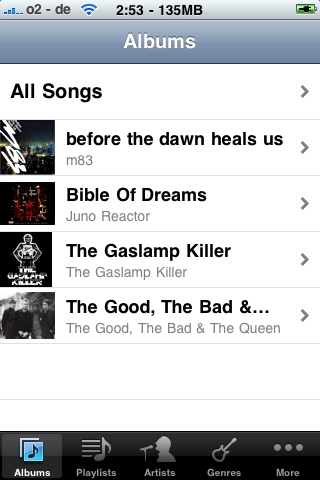
This application will permit you to sync your music without any requirements to iTunes !! You can have easily access to your iPod library on your iDevice.
Compatible iOS4.

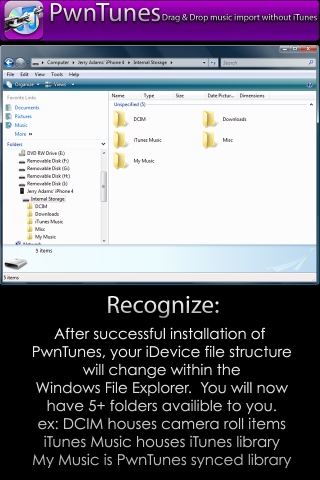
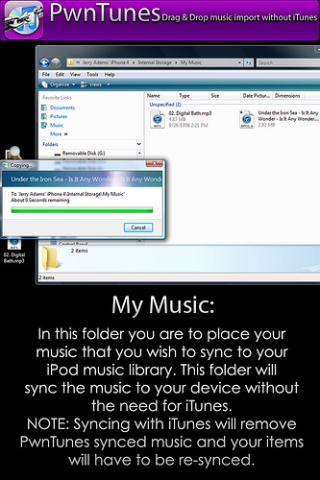
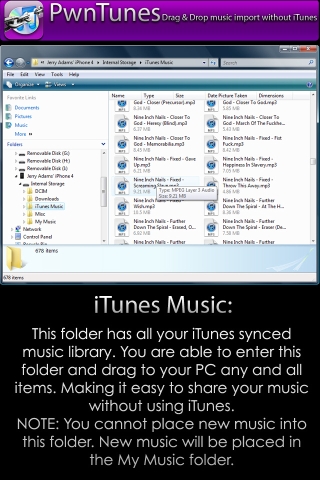
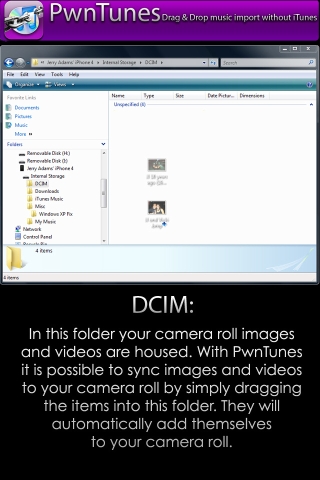
Repo : BigBoss
Version : 1.2.4.3
Autor : SpiritOfLogic
Compability : OS x3,iOS 4
Price : 12,99$
[How-To] Enter/Exit Recovery Mode in ONE Clic using iRecfo
Monday, September 13, 2010

Download 1.03 : Official
iRecfo is a utility for Windows users, developed by Kirma.
This software allows you to enter or exit mode Recovry in a click. This can be used when restoring an old OS via iTunes and you're stuck Recovry mode.


You can also try RecBoot.
iPhone Folders 1.0.32
Tuesday, July 13, 2010

Update : Just a little news to inform you that this extension is compatible iTunes 9.2 and iOS 4
iPhone Folders is an integrated extension for Windows - For jailbroken iPhone.
Your iPhone will appear as a hard drive in Windows and also with all his files exactly like SSH connection.
For non jaibroken iPhone, only media are displayed.

Required :
- Jailbroken jailbroken iPhone or iPod Touch.
- USB connection.
- Open SSH et afc2add if jailbreak with Blackra1n for jailbroken iPhone.
- iPhone Folders 1.0.32.
- V 1.0.32 : Compability with iTunes 9.1 and iTunes 8.1
Compatible with Firmware 3.1.2 – 3.1.3 and iTunes 8 or 9.
NOT compatible with Windows Seven x64 bits
[How-To] Determine your type of jailbreak using iDeviceCompatibility
Sunday, April 11, 2010

iDeviceCompatibility is a new tool for Frenchies from the dev of BackupHelper (only french language).
This software will automatically determine if the jailbreak or the unlock is possible for your iDevice, and it redirects you to a tutorial to do it.
It also displays some information of your iDevice such as the serial number, Model version, Firmware, Mac address...
This software is designed for not jailbroken and jailbroken users.


- Beta Version
- iDeviceCompatibility
i-FunBox
Friday, April 02, 2010

Since the latest update of iTunes 9.1, some users are experiencing an issue with the software i-FunBox.
Here is how to fix easily this issue.
i-FunBoX is a utility for all users who wish to connect their jailbroken or not jailbroken iPhone to their computer with USB cable and then they have a great rate of transfer.

- Download the latest version of i-FunBox for Windows.
- Connect your iDevice to your computer.
- It appears the following message if you have iTunes 9.1 :
if you failed to connect to your iphone with ifunbox, or it can not detect your iphone,
or if ifunbox says « Failed to locate Apple Mobile device Support, iTunesMobileDevice.dll is not found », please try this.
- Go to C:\Program Files\Common Files\Apple\Mobile Device Support
- Common Files is for Windows XP

- You may find 2 dll files : iTunesMobileDevice.dll and iTunesMobileDevice2.dll
- This is in the case of use of Blackbreeze.
- In a folder, insert the .exe file of i-FunBox and also iTunesMobileDevice2.dll
- Rename iTunesMobileDevice2.dll to iTunesMobileDevice.dll
- For the others, you just have to copy iTunesMobileDevice.dll in the folder with the .exe file of i-FunBox.

- i-FunBox works again now !
- For Mac users, here is an equivalent iFuntastic.
iTunes 9.1
Wednesday, March 31, 2010

Update : For sure, Jaibreak is safe !

As envisaged at a few days of the official release of the iPAD, here is a new update of iTunes.

This new update brings the support of the synchronization of the new iPAD.
- Support for iPad.
- Rename, rearrange or remove Genius mixes.
- Support for iBooks for iPad.
- All versions of iTunes.
Jailbroken Users
- Appsync is still working.
- SSH connection with softwares like iTunnel Suite or iFunBox is still working.
- It is NOT recommended to update iTunes to version 9.1 but a fix is planned in case of you did to be able to use Blackra1n.


- According to iH8sn0w, Windows users have an issue with Blackra1n, issue not met for Mac users.
- If you made the mistake to upgrade iTunes, read this to downgrade your iTunes version.
- Or use Blackbreeze to fix the issue with Blackra1n and iTunes 9.1.
[How-To] Determine your type of jailbreak using f0recast 1.1
Friday, March 26, 2010

Update : Version 1.1 released for Mac !
Download 1.1 for Windows : Official
Download 1.1 for Mac : Official
f0recast is a tool of the Dev Team which will permit you to know if your iPhone can have a tethered or untethered jailbreak, by detecting your baseband (Blacksn0w (05.11.07) ou Ultrasn0w (04.26.08)).

Notes :
---------------------------------------------
This is not a Jailbreak tool.
Displays the following information :
- Serial number of your device
- Version of your baseband
- Version of your Firmware.
- Determine if you have a jailbreak tethered or untethered.
- Determine if your baseband can be unlocked.
Notes :
- Jailbreak untethred : If you reboot your device, the jailbreak is still actived.
- Jailbreak tetherd : If you reboot your device, the jailbreak is not actived then you must jailbreak again.
- Blacksn0w : application of Cydia which permit to unlock the baseband 05.11.07
- Ultrasn0w : application of Cydia which permit to unlock the baseband 04.26.08
Compatible :
- iPhone.
- iPod.
- Windows only.
---------------------------------------------
Previous Version
1.04 : Official
Cyder 2
Tuesday, March 09, 2010

Download link : Cyder2-0.1-RC2.zip
Cyder is a utility for Windows users which will permit you to download and install a Cydia application (deb file) with your computer.


- Import sources of Cydia from your device in Cyder.
- OpenSSH installed.
- In case of jailbreak with Blackra1n, don't forget to install afc2add patch.
- Cydia Auto installation : reboot (twice minimum) your iPhone to finish installation of debs.
- Cydia Cache : Install with Mobile Terminal /private/var/cache.
- AppCake Folder : Start theapplication AppCake after the transfert of debs.
- Download and save on your computer all Cydia applications and dependencies.
- Compatible with the application AppCake
CaniHazRecover
Monday, March 08, 2010

Here is a utility for Mac users only !
If after installaing some packages from Cydia, your device reboot but it freezes on the black screen with Apple's logo… sometimes, the only solution to re-activate your iPhone is a complete restore of Firmware, it often happens in case of an unstable jailbreak or a conflict of packages from Cydia.

CaniHazRecover will then permit you to restore only the necessary files to a clean start of your device.

- Download CaniHazRecover (Mac).
- Unzip and start the .exe with a red sticker.
- Follow steps which bring you to DFU mode.

- Follow all steps and you should recover your device without any loss of data
- Beta Version.
- Compatible with iPhone V1 et 3G, iPod Touch 2G no MC
WinSCP 4.2.5
Monday, February 15, 2010

Connect your iPhone with SSH
Winscp v4.2.5 is a software which permits you to connect your jailbroken iPhone with SSH using Wifi. The configuration is simple and fast !
Notes :
- Changelog
- Open SSH needed
- Relever votre iP de l’appareil dans Réglages – Wifi
- Login : root
- Pass : alpine by default
- Let the port 22 by default
- Winscp 4.2.5
Redsn0w 0.9.4 and 0.8
Wednesday, February 10, 2010

Jailbreak your iPhone with Redsn0w 0.9.4
Notes :
- Redsn0w 0.9.4 is compatible with Firmware 3.1.3
- Only compatible with iPhone 1G/3G and iPod Touch 1G/2G
- You must update to Firmware 3.1.3 but you need the Firmware 3.1.2
- During the jailbreak, you must use the Firmware 3.1.2
- Redsn0w 0.9.4 (Windows / Mac)
- Installation : just follow the video tutorial

Ultrasn0w : Unlock iPhone 3G/3GS
Friday, February 05, 2010

Since the Firmware 3.1.3, the version of the baseband changed : 05.12.01.
There's no way available for the moment to unlock an iPhone with this baseband.
Ultrasn0w only permit to unlock the baseband lower than 05.11.
Available on the official repo in Cydia : repo666.ultrasn0w.com
Remove your PIN code before installing Ultrasn0w or Blacksn0w.

Blacksn0w only for baseband 05.11.07
AUTOMATIC INSTALLATION
Required :Update this source in Cydia :
- a jailbroken iPhone or iPod Touch.
- Cydia.
http://blackra1n.com/


- Install Blacksn0w.
- Reboot your iPhone.
MANUAL INSTALLATION
Required :
- a jailbroken iPhone 3G or 3GS
- Cydia
- blacksn0w.deb
- Installation
- Reboot your iPhone.
V0.92 : Carrier logo fix
USA
Thailand
Austria
Trinidad
Germany
China
Kuwait
Serbia
Poland
France
Nigeria
Egypt
Pakistan
Ireland
UK
Turkey
Sweden
Switzerland
Malaysia
Hungary
The Netherlands
Bahamas
Jamaica
India
Israel
Unlock iPhone 3G and 3GS without Wifi and Cydia.
Subscribe to:
Posts (Atom)