[Crack] CameraButtons 1.0
Thursday, March 10, 2011

Download 1.0 Cracked : Official
Requires iOS 4.0+
CameraButtons gives you complete touch-free control of your iOS camera app.
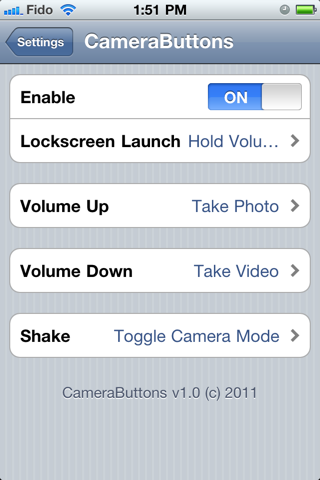
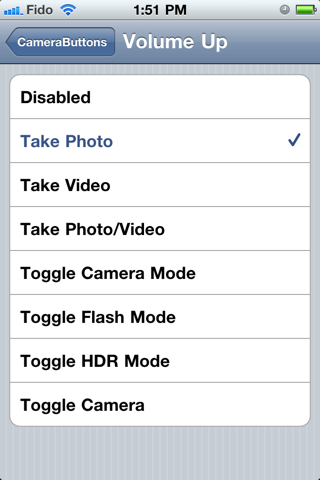
You can set the volume up button, volume down button, and shake action to any of the following functions:
Take Photo:
Switches to photo mode if not already in photo mode and takes a picture.
Take Video:
Switches to video mode if not already in video mode and begins recording.
Take Photo/Video:
Snaps a photo or starts video recording depending on which mode the camera is currently in.
Toggle Flash:
Switches Flash between Off, Auto, and On modes for compatible devices.
Toggle HDR:
Switches HDR mode On and Off for compatible devices.
Toggle Camera:
Switches between the front and back cameras for compatible devices.
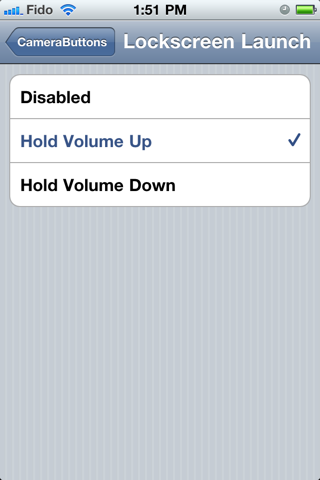
CameraButtons also has a Lockscreen Launch function which lets you open the Camera app straight from your Lockscreen by holding down the Volume Up or Volume Down button.
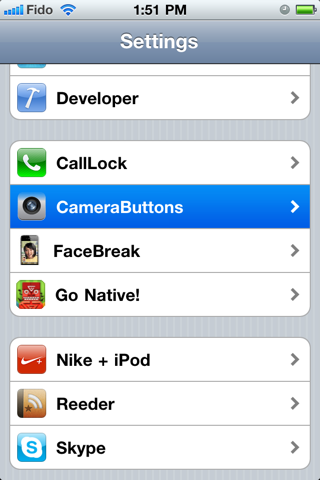
****CameraButtons does not add an icon to your Springboard. You need to open the Settings app and enable it from the CameraButtons preference menu.****
Notes :
[News] iOS 4.3 vs. iOS 4.2.1 Web Browsing Speed Test *VIDEO*
Wednesday, March 09, 2011

With the iOS 4.3 Golden Master hitting dev’s iPhones and iPads the world over, we’ve all been wondering just how much faster Safari is now that the new JavaScript optimizations have been added. The answer? A bit.
Gizmodo did have a video showing the speed increase which unfortunately seems to have been pulled. We’ve imbedded it below just in case it re-appears but the general gist is this: don’t expect a night and day increase in speed.
In loading the NY Times website in Mobile Safari, the new iOS version shows a decreased loading time of a couple of seconds when compared to iOS 4.2.1. Not a massive difference, though any speed increase is obviously welcome!
[Crack] Grooveshark 2.0.1
Wednesday, March 09, 2011

HOW-TO BYPASS TRIAL PERIOD
Go to: /var/mobile/Library/Preferences/com.grooveshark.Grooveshark.plist
change your 5 digit mobileID to any digits, it will keep the 14 day trial going (possibly forever)
---------------------
I'm not shy about my love of Grooveshark. No one pays me to say it, it's just the best streaming music app I've used -- and it's fully functional in Canada unlike some of its geotarded cousins in the audio game.
They caused a bit of a ruckus recently when they decided to push their iPhone app -- which had been roundly denied by Apple -- via Cydia, doing an end run around Jobs and Co.
There are two things to know about the app. First, it's awesome. It's quite possibly the greatest thing I've ever installed on my jailbroken iPod touch. Second, there's just no way Apple would ever have approved Grooveshark the way it was released. As much as I enjoy the ability to make single songs and entire playlists available offline with the push of a button, it's not the kind of functionality Apple wants on its devices.
ed: as pointed out by commenters, Spotify -- which was approved -- does offline music as well. I've reached out to Grooveshark Josh Bonnain for some clarification about what went down. It's also worth noting that both Palm and Blackberry approved Grooveshark.
That said, if you're using a jailbroken device, find Grooveshark and install it. The app is pure mobile music goodness, and the missing piece in Grooveshark's all-around awesomeness puzzle.
Apart from providing fast access to your playlists and favorite songs, you've also got Grooveshark's entire library at your disposal via the search screen. You can also favorite, like, and dislike tunes while you listen.
Have a look at the screenshots after the break, and see what you're missing if you don't have a jailbroken iPhone or iPod!


[News] You Can Now Watch The Entire iPad 2 Event Keynote Video Online
Saturday, March 05, 2011

It’s taken a few hours, but Apple’s website is now home to the video of today’s iPad 2 event. Eager viewers can also download the video using the Apple Keynote podcast channel in the iTunes Store.

Weighing in at a whopping 867MB in size, the keynote is downloading at varying speeds for people all across the globe, with many reporting stalled downloads. If you’re desperate to see the keynote ASAP then we suggest trying the streaming version, though the quality does leave a lot to be desired.
We’re hoping for a nice HD version sooner rather than later – you can’t have something as gorgeous as the iPad 2 being shown in such poor video quality!
Also, isn’t it great to see Steve Jobs on stage?
[News] iPad 2 vs. Galaxy Tab 10.1 vs. Motorola Xoom vs. HP TouchPad vs. BlackBerry PlayBook *TABLET WARS*
Saturday, March 05, 2011
It’s finally here. Apple today announced the much-anticipated 2nd-generation iPad. With Google’s Android, RIM’s BlackBerry powered PlayBook, and HP’s webOS getting fancy new tablets either recently or in the future, buyers are going to be spoilt for choice when it comes to selecting a new slate device.
We thought we’d take a closer look at the iPad 2′s four main competitors in the tablet space: Samsung Galaxy Tab 10.1, Motorola Zoom, HP/Palm’s TouchPad and BlackBerry PlayBook.
Apple iPad 2
First up we’ve got the new kid on the block, Apple’s iPad 2. Announced by Steve Jobs to be powered by a dual-core CPU that’s supposedly twice as fast as the current iPad. The new graphics chips are ’9x faster’ too. Impressive, at least on paper. In typical Apple fashion, we don’t have actual figures other than the usual dimensions. Thickness? 8.8mm. That’s one third thinner than the current model.
Interestingly, the new iPad 2 features two cameras, one rear and one front facing and the most interesting specification of them all is the availability of the new white iPad. Apple couldn’t get a white iPhone 4 out the door but no such issues with the iPad 2.

Samsung Galaxy Tab 10.1
Samsung showed off its new Galaxy Tab 10.1 at this year’s Mobile World Congress in Barcelona, with the new tablet hoping to build on the success of its smaller sibling.
Sporting a new 10.1-inch 1280×800 display (hence the name), the new Tab boasts some impressive specifications. Powering that new screen is a 1GHz dual-core Tegra 2 CPU with both front and rear facing cameras providing the video input. The Tab’s rear camera is capable of HD video recording and has the now obligatory in-built flash.
Software-wise, the Galaxy Tab 10.1 will run the latest and greatest from Google’s Android stable, namely 3.0 Honeycomb.

Motorola Xoom
Another Honeycomb-endowed offering is Motorola’s Xoom. Recently released in the United States, the Xoom has been very well received by the gadget press. Arguably a very similar machine to the Galaxy Tab 10.1 – at least spec-wise – the Xoom’s party piece is its LTE capability. The downside here is the wait. Early-adopters will need to send their unit away for a hardware upgrade in order to take advantage of LTE speeds. Fortunately a quick turnaround is promised by Motorola, with 6 days the expected wait.
With the Xoom being powered by Google’s Android OS in its latest Honeycomb guise, there is little to differentiate it from the Galaxy Tab 10.1 when it comes to software. The main difference? The Xoom is in stores now!

HP TouchPad
Originally expected to go under the Palm name, the TouchPad will run on a new version of webOS. Now at version 3.0, webOS is promising to be a truly tablet-optimized experience. Even during the Pre’s death-throws, many believed the OS was the phone’s best attribute and a tablet was always the logical home for a future updated version.
HP isn’t scrimping on the hardware front either. A 1.2GHz Qualcomm Snapdragon dual-core CPU is the heart of the machine, with 1GB of RAM keeping the CPU busy. An iPad-like 9.7-inch 1024×768 screen is used, along with all the usual radios we’ve come to expect, including a 4G one. The TouchPad does sport a front-facing camera, though there’s nothing around the back.

BlackBerry PlayBook
With PlayBook, Research In Motion (RIM) is the fourth major platform (in no particular order) after Android, iOS and webOS to enter the Tablet Wars. PlayBook features 1Ghz dual-core processor, 1GB RAM, 1080p HD video playback and HDMI output.
Powered by BlackBerry Tablet OS with UI designed by QNX, RIM’s PlayBook is expected to hit retail shelves in April this year.

Which device you ultimately stump up for very much depends what you want from a tablet device. Apple’s iPad 2 has the massive advantage of being tied into the largest App Store on the planet, though many would also consider that to be its biggest weakness. If you’re the tinkering type, and prefer the more gritty approach of Android then the Xoom or Galaxy Tab 10.1 will be right up your street. The Android Market is constantly growing though the quality of apps perhaps isn’t quite there just yet, and Honeycomb promises a new raft of software specifically designed for tablets. HP’s offering is a real unknown at this point. A new OS, with new hardware from a company that hasn’t done well with mobile devices in the recent-past could prove disastrous though we doubt it. What we’ve already seen of the TouchPad looks mighty impressive, and the thought of webOS on a 9.7-inch screen excites us. Same goes for RIM’s BlackBerry powered PlayBook. Will there be enough apps for HP’s new tablet or RIM’s PlayBook? That’s the real question.
Ultimately the decision as to which tablet is right for you is a personal one. Many will plump for the safety and security of iOS while others want the power of Android. A few will even want to take a chance on the TouchPad or PlayBook, and who could blame them? We’re not sure where our money will be going, but today’s iPad 2 announcement sure makes for an interesting few months ahead.
Is 2011 the year of the tablet? You betcha!
Read more...
We thought we’d take a closer look at the iPad 2′s four main competitors in the tablet space: Samsung Galaxy Tab 10.1, Motorola Zoom, HP/Palm’s TouchPad and BlackBerry PlayBook.
Apple iPad 2
First up we’ve got the new kid on the block, Apple’s iPad 2. Announced by Steve Jobs to be powered by a dual-core CPU that’s supposedly twice as fast as the current iPad. The new graphics chips are ’9x faster’ too. Impressive, at least on paper. In typical Apple fashion, we don’t have actual figures other than the usual dimensions. Thickness? 8.8mm. That’s one third thinner than the current model.
Interestingly, the new iPad 2 features two cameras, one rear and one front facing and the most interesting specification of them all is the availability of the new white iPad. Apple couldn’t get a white iPhone 4 out the door but no such issues with the iPad 2.

Samsung Galaxy Tab 10.1
Samsung showed off its new Galaxy Tab 10.1 at this year’s Mobile World Congress in Barcelona, with the new tablet hoping to build on the success of its smaller sibling.
Sporting a new 10.1-inch 1280×800 display (hence the name), the new Tab boasts some impressive specifications. Powering that new screen is a 1GHz dual-core Tegra 2 CPU with both front and rear facing cameras providing the video input. The Tab’s rear camera is capable of HD video recording and has the now obligatory in-built flash.
Software-wise, the Galaxy Tab 10.1 will run the latest and greatest from Google’s Android stable, namely 3.0 Honeycomb.
Motorola Xoom
Another Honeycomb-endowed offering is Motorola’s Xoom. Recently released in the United States, the Xoom has been very well received by the gadget press. Arguably a very similar machine to the Galaxy Tab 10.1 – at least spec-wise – the Xoom’s party piece is its LTE capability. The downside here is the wait. Early-adopters will need to send their unit away for a hardware upgrade in order to take advantage of LTE speeds. Fortunately a quick turnaround is promised by Motorola, with 6 days the expected wait.
With the Xoom being powered by Google’s Android OS in its latest Honeycomb guise, there is little to differentiate it from the Galaxy Tab 10.1 when it comes to software. The main difference? The Xoom is in stores now!
HP TouchPad
Originally expected to go under the Palm name, the TouchPad will run on a new version of webOS. Now at version 3.0, webOS is promising to be a truly tablet-optimized experience. Even during the Pre’s death-throws, many believed the OS was the phone’s best attribute and a tablet was always the logical home for a future updated version.
HP isn’t scrimping on the hardware front either. A 1.2GHz Qualcomm Snapdragon dual-core CPU is the heart of the machine, with 1GB of RAM keeping the CPU busy. An iPad-like 9.7-inch 1024×768 screen is used, along with all the usual radios we’ve come to expect, including a 4G one. The TouchPad does sport a front-facing camera, though there’s nothing around the back.
BlackBerry PlayBook
With PlayBook, Research In Motion (RIM) is the fourth major platform (in no particular order) after Android, iOS and webOS to enter the Tablet Wars. PlayBook features 1Ghz dual-core processor, 1GB RAM, 1080p HD video playback and HDMI output.
Powered by BlackBerry Tablet OS with UI designed by QNX, RIM’s PlayBook is expected to hit retail shelves in April this year.
Which device you ultimately stump up for very much depends what you want from a tablet device. Apple’s iPad 2 has the massive advantage of being tied into the largest App Store on the planet, though many would also consider that to be its biggest weakness. If you’re the tinkering type, and prefer the more gritty approach of Android then the Xoom or Galaxy Tab 10.1 will be right up your street. The Android Market is constantly growing though the quality of apps perhaps isn’t quite there just yet, and Honeycomb promises a new raft of software specifically designed for tablets. HP’s offering is a real unknown at this point. A new OS, with new hardware from a company that hasn’t done well with mobile devices in the recent-past could prove disastrous though we doubt it. What we’ve already seen of the TouchPad looks mighty impressive, and the thought of webOS on a 9.7-inch screen excites us. Same goes for RIM’s BlackBerry powered PlayBook. Will there be enough apps for HP’s new tablet or RIM’s PlayBook? That’s the real question.
Ultimately the decision as to which tablet is right for you is a personal one. Many will plump for the safety and security of iOS while others want the power of Android. A few will even want to take a chance on the TouchPad or PlayBook, and who could blame them? We’re not sure where our money will be going, but today’s iPad 2 announcement sure makes for an interesting few months ahead.
Is 2011 the year of the tablet? You betcha!
[News] The iPad 2 – Price, Features, Availability – Everything You Need to Know !
Saturday, March 05, 2011

Finally the moment has arrived when you have something more than a rumor round up on the second generation iPad. The announcement of iPad 2 is probably the second most awaited moment of the year for Apple fans, first one being the launch of iPhone 5. Want to grab the second-gen iPad ASAP? We’ll guide you through everything you need to know.
Availability
Pre-Ordering
You don’t want to want to get late, do you? iPad 2 is expected to run out of stock soon after the launch. If you want to be one of the first ones to grab this magical device, pre-order is the way to go. The first iPad was announced in end of January, while the shipment began in April. The pre-ordering for iPad 2 however starts real soon. How soon? 11th of March for the US and 25th for 26 other countries.
Want to Get it Off Store?
Sure, no problem. However, again, pre-order is the way to go if you plan to grab it on the launch date or you will have to get into the never ending queues at your nearest Apple store. The device is expected to be available on all Apple stores about a month after the pre-order

Price and Features
Price
As speculated, the new product comes in the same price. Starting from $499, you will be charged for the amount of storage and type of connectivity you choose

Dual Core A5 CPU (and Superfast Gaming Graphics)
Speculations come true! That’s exactly how we thought the evolution of iPad is going to be and the Jobs announces dual core CPU. The CPU will be at-least 2x faster with the graphics as much as 9x.
Thinner & Lighter
Like we reported earlier, the new-gen iPad is really really thin and lighter too. As jobs puts it, despite adding so much to the original iPad, it’s still 33 percent thinner. The width has went from 13.4mm to 8.8mm which makes it even thinner than the iPhone 4.

Colors (Black and White)
Finally Apple has figured a way to make the product white without having to degrade the cam quality. With that Apple announces iPad 2 in white. Not only it’s announced, it will be available from the day one. Just because we highlighted the white one doesn’t mean the won’t offer it in black.

Front Facing Camera for FaceTime
Finally you can say good-bye to one-sided video calls as Apple officially introduces Facetime in iPad 2 with a front facing camera. Some people may argue that self-snapshots on a 10" tablet is plain weird but I think video calls on iPad will be so much more fun than iPhone. If you can do on TVs, why not on a tablet?

HD Camera on Back for Shooting Videos in 720p
Yup! There is a camera on the back too for shooting videos in 720p HD quality.
Gyroscope
With the built-in accelerometer, you can rotate iPad to portrait or landscape, or even upside down, and whatever you’re watching, reading, or seeing adjusts to fit the display. And now the accelerometer, three-axis gyroscope, and compass all work together. They sense which direction iPad is heading and how it’s moving. So games, maps, and other apps know your every twist, turn, tilt, and 360. It’s an epic win for gaming. And it’s just the beginning of better-than-ever iPad apps.iOS 4.3
iPad 2 will ship with the latest and greatest release of iOS to date, that is iOS 4.3, which will be available for download on March 11.
3G on AT&T and Verizon
Every iPad is built with advanced 802.11n wireless technology. It automatically finds Wi-Fi networks, which you can join with a few taps. iPad is also available with 3G connectivity on either AT&T or Verizon Wireless networks. So if you’re somewhere without Wi-Fi, such as outdoors on a camping trip or on the road, you can still surf the web, check email, or get directions.Same Screen and Battery Life
iPad is one big, beautiful display — 9.7 inches of high-resolution photos, movies, web pages, books, and more. LED backlighting makes everything you see remarkably crisp, vivid, and bright. Even in places with low light, like an airplane. And there’s no wrong way to hold iPad. It’s designed to show off everything in portrait and landscape, so with every turn (even upside down), the display adjusts to fit. Because it uses a display technology called IPS (in-plane switching), it has a wide, 178° viewing angle. Hold it up to someone across the room, or share it with someone sitting next to you, and everyone gets a brilliant view.
Even with the new thinner and lighter design, iPad has the same amazing 10-hour battery life.1 That’s enough juice for one flight across the ocean, or one movie-watching all-nighter, or a week’s commute across town. The power-efficient A5 chip and iOS keep battery life from fading away, so you can get carried away.
Accessories
What do you get along? well, not a lot of stuff but these two handy accessories.
HDMI 1080p Video Out
Just for $39, you can now have HDMI on you iPad 2 which supports output upto 1080p. All you need is a cable. The real innovative part? It even charges your device while the cable is plugged.

Smart Cover
Since the original iPad case completely covered the beautiful device, Apple introduces smart covers with iPad 2. It’s just a flap that covers the front of the iPad and sticks to it. The best part? Auto wakes up as you put it off and auto sleeps as you close it. The flap also has fiber cloth on it that cleans the screen. It sticks to the device by using magnets which is what lets it auto-align to the device’s screen. The smart cover are available in both Poly and Leather. Poly cases, both available in 5 colors each, will cost you about $39, leather covers being expensive and more elegant cost $69

and that’s all we have from iPad 2.
[Crack] FastSnap 1.40
Tuesday, March 01, 2011

Update : Version 1.40 released ! Crack is out !!
v 1.40
- Now Supports iOS 4.2.1 & 4.2.6 (Verizon)
- Silent Shutter Also Affects Video Recording Beeps
- Added FastSnap Icon To Settings
- Fixed Status Bar Drag Camera Activation on iOS 4.2.1
- Fixed MobileSubstrate Plist
Download 1.40 Cracked : Official
FastSnap allows taking photos/videos using the volume controls. This makes the iPhone more suitable device for taking pictures
No more searching for that little button inside the Camera application/view !
Just use the Volume buttons to capture a photo or video inside the Camera application or any other application that have a camera functionality. With FastSnap you can also silent the shutter sound when taking a picture from settings.
* Supports iOS 4 & iPhone 4 !
Notes :
----------------------------------------------------
Previous Version
1.32 : Official
1.31 : Official
1.3 : Official
Previous Version
1.32 : Official
1.31 : Official
1.3 : Official
[Crack] Firewall iP 2.01-1
Tuesday, March 01, 2011

Update : Version 2.01-1 released ! Crack is out !!
v2.01
* minor fixes/improvements
* fixes crash issue with 3.x
Download 2.01 Cracked : Official
Works well with 4.2.x!
Firewall iP is the only security tool of its kind for iPhone and iPod touch.
Firewall iP allows you to block outgoing connections (TCP & UDP). It hooks into applications and will warn you if the app wants to establish a connection to a host and shows you the hostname. Then you have the options to allow or deny the connection once/always or allow/deny all connections for the application. Port specific blocking is possible.
You can decide if the application will send data. Developers will no longer be able to collect stats and data about you (UDID, phone number, usage statistics...). With Firewall iP you can cover all app analytic providers which aren't in PrivaCy and also custom analytics.
Blocking of ads is also possible with this powerful tool. Now, you are the one who decides!
Save money buy reducing your data usage.
Cydia and RockApp are excluded for obvious reasons.
Features:
* Block outgoing TCP & UDP connections selectively
* port specific blocking
* Shows you the hostname for the connection & can provide you with WhoIs information
* Can block connections of apps when you are on a cellular network (save data!)
* Block analytic providers / data collectors which PrivaCy can’t
* Block unneeded content (ads
* Easy to use interface & control app
*and many more…. FiP is very powerful
Compatibility:
Firewall iP has been tested to work on all iPhones, iPods and iPads running firmware 3.0 to 4.2.x.


Notes :
- Installation
Firewall iP is the only security tool of its kind for iPhone and iPod touch.
Firewall iP allows you to block outgoing connections (TCP & UDP). It hooks into applications and will warn you if the app wants to establish a connection to a host and shows you the hostname. Then you have the options to allow or deny the connection once/always or allow/deny all connections for the application. Port specific blocking is possible.
You can decide if the application will send data. Developers will no longer be able to collect stats and data about you (UDID, phone number, usage statistics...). With Firewall iP you can cover all app analytic providers which aren't in PrivaCy and also custom analytics.
Blocking of ads is also possible with this powerful tool. Now, you are the one who decides!
Save money buy reducing your data usage.
Cydia and RockApp are excluded for obvious reasons.
Features:
* Block outgoing TCP & UDP connections selectively
* port specific blocking
* Shows you the hostname for the connection & can provide you with WhoIs information
* Can block connections of apps when you are on a cellular network (save data!)
* Block analytic providers / data collectors which PrivaCy can’t
* Block unneeded content (ads
* Easy to use interface & control app
*and many more…. FiP is very powerful
Compatibility:
Firewall iP has been tested to work on all iPhones, iPods and iPads running firmware 3.0 to 4.2.x.
Notes :
- Installation
Features :
- Block outgoing TCP & UDP connections selectively
- Shows you the hostname for the connection
- Block analytic providers which PrivaCy can't
- Block unneeded content
- Easy to use interface & control app
- Edit the rules you did set
- Add apps manually
- Low memory & CPU consumption
Cydia is excluded for obvious reasons.
-----------------------------------
Previous version
2.00-1 : Official
2.00 : Official
1.49-1 : Official
1.39-4 : 4shared
1.39-2 : 4shared
1.39-1 : 4shared
1.39 : 4shared
2.00-1 : Official
2.00 : Official
1.49-1 : Official
1.39-4 : 4shared
1.39-2 : 4shared
1.39-1 : 4shared
1.39 : 4shared
1.35 : 4shared
Subscribe to:
Posts (Atom)